10 Excel Tricks Every Student Should Know (For College & Work)

Excel is more than just a spreadsheet tool — it’s a skill that every student should learn for college projects, internships, and jobs. Here are 10 simple Excel tricks that improve productivity, data handling, and presentation.

Trick #1: AutoSum

Quickly add rows or columns by selecting cells and pressing Alt + =. Useful for budgets, expenses, and project calculations.

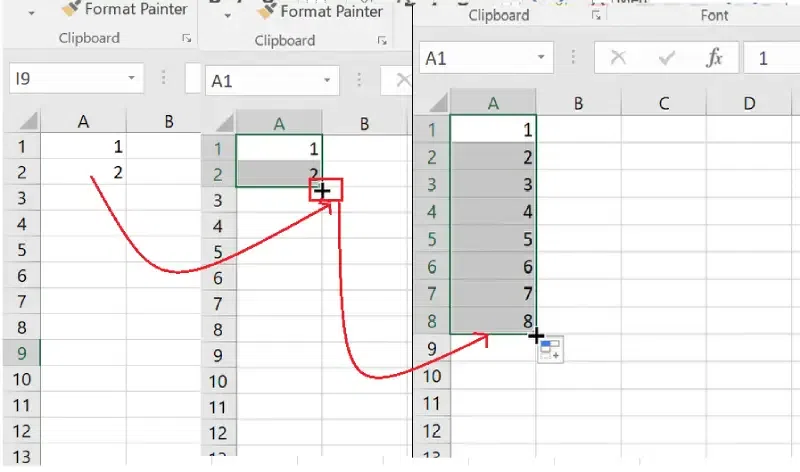
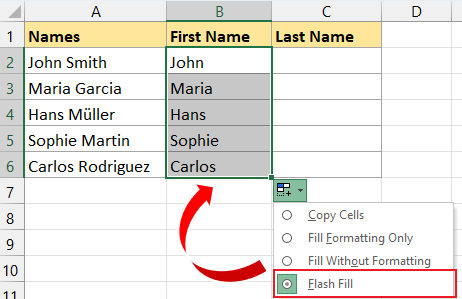
Trick #2: Flash Fill

Type a pattern once, drag down, and Excel fills the rest automatically. Great for formatting names, emails, or dates.

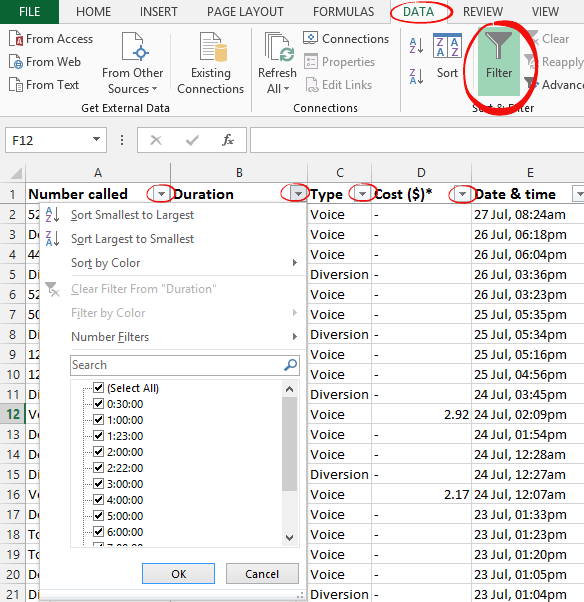
Trick #3: Sort & Filter

Organize data instantly by sorting alphabetically, numerically, or by date. Filters help you view only what you need.

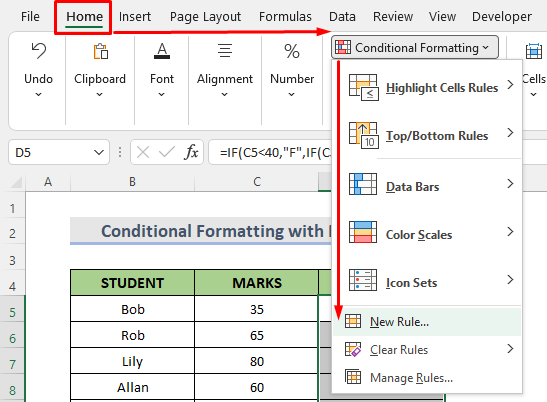
Trick #4:ConditionalFormatting

Highlight cells based on conditions — marks below 40, duplicate values, overdue dates, etc.

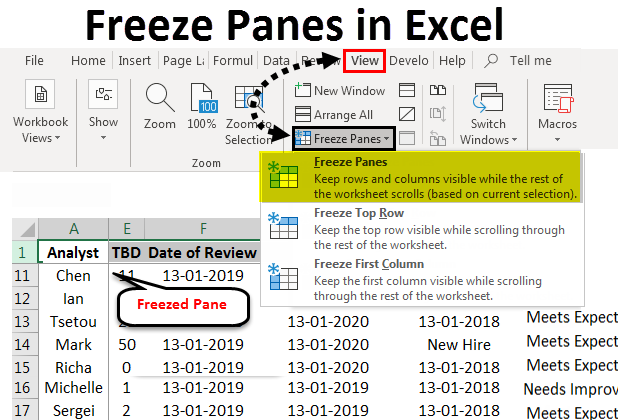
Trick #5: Freeze Panes

Keep your headers visible while scrolling through long tables by going to View and then Freeze Pannels.


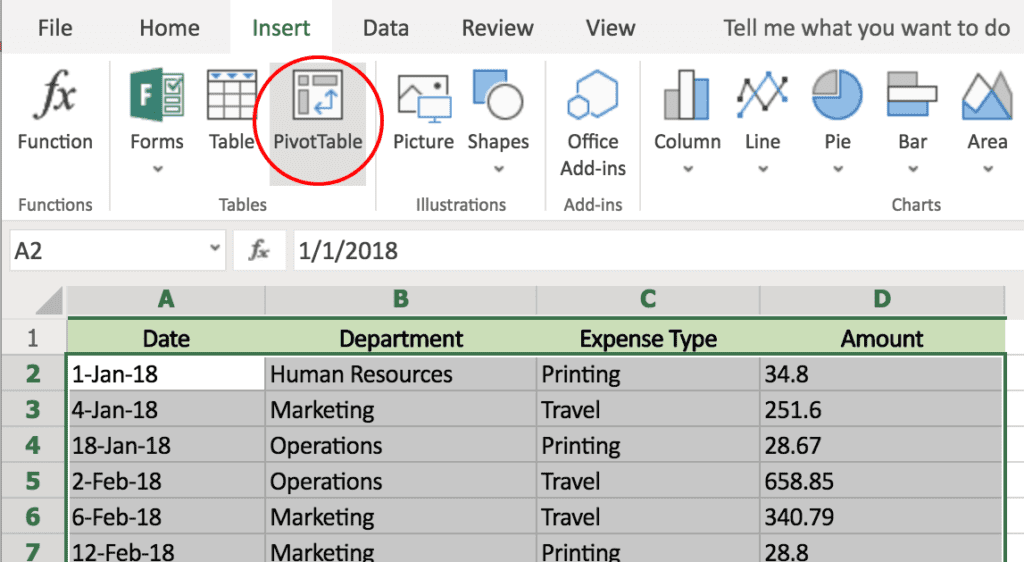
Trick #6: Pivot Tables

Summarize large data without formulas. Drag and drop fields to create instant reports.

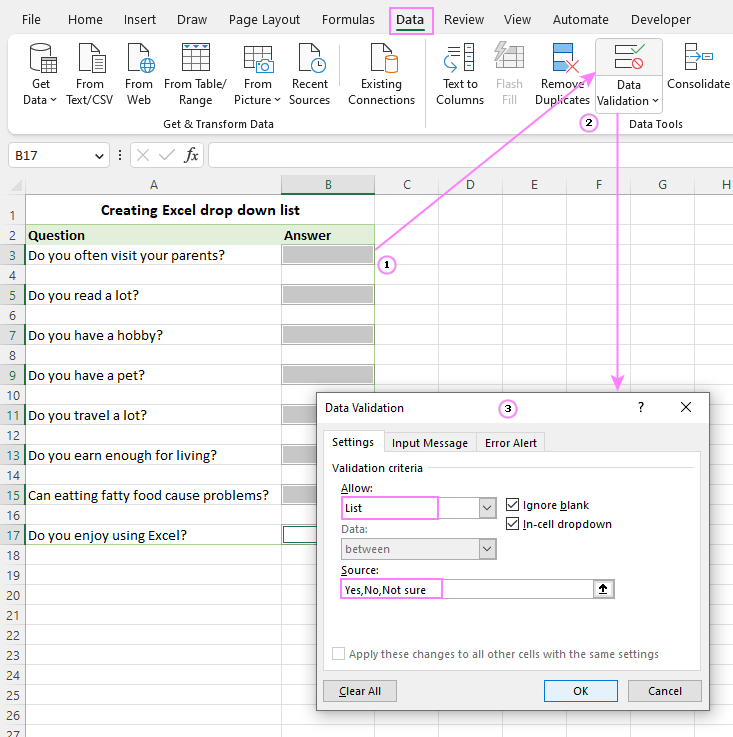
Trick #7: Data Validation

Create dropdown lists to avoid typing mistakes and improve consistency.

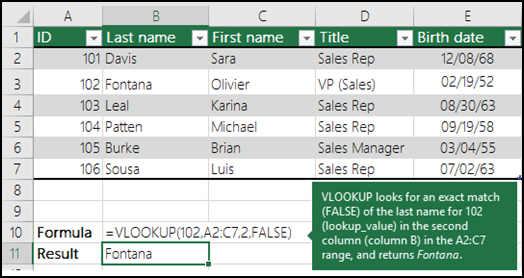
Trick #8: VLOOKUP

Also known as XLOOKUP helps in searching data across tables and return matching values automatically

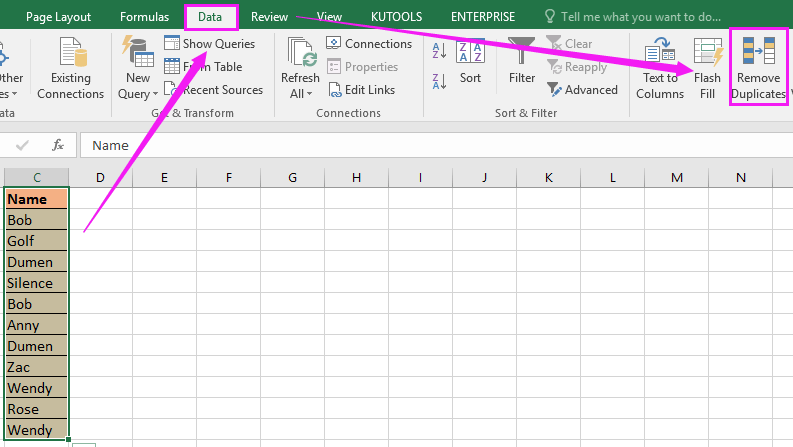
Trick #9: Remove Duplicates

Instantly clear duplicate data very useful for survey responses or attendance sheets go through Data and Remove Duplicates

Trick #10: Keyboard Shortcuts

Learn simple shortcuts to work faster.

Ctrl + CCopy
Ctrl + XCut
Ctrl + SSave workbook
Ctrl + NCreate new workbook
Ctrl + WClose current workbook
Ctrl + F4Close Excel
Ctrl + Page DownMove to next tab
Ctrl + Page UpMove to previous tab

Conclusion

Mastering Excel gives students a huge advantage in college projects, research assignments, data analysis, budgeting, and presentations. Learning Excel tricks and shortcuts helps you complete tasks faster, organize information better, and improve overall productivity. Whether you are creating a monthly budget, tracking marks, managing attendance, or presenting survey data, Excel skills make work easier, clearer, and more professional.
With consistent practice, Excel becomes one of the most valuable technical skills any student can learn for future careers. Excel knowledge is no longer limited to IT or finance students — it is used in every academic field and industry. Small shops use Excel for daily billing and inventory, teachers use it to track student performance, HR teams manage employee data, marketing professionals analyze campaigns, and large corporate companies rely on spreadsheets for forecasting, reporting, and decision-making.
For college students preparing for internships or job interviews, Excel skills stand out on a resume and make you more job-ready. As data management and digital productivity become essential in the modern workplace, learning Excel early gives you a long-term advantage across multiple sectors. The better you understand Excel, the easier it becomes to analyze information, solve real-world problems, and communicate insights clearly.

Want to improve your Excel skills even further?                   To join our Advanced Excel Course  Click  Her

Excel or Google Sheets — Which One Should Students Use?

Excel and Google Sheets are both popular spreadsheet tools, but each has its own strengths. Excel is the better choice when you need advanced features like pivot tables, large datasets, charts, macros, or detailed formatting. Students working with big assignments, survey results, or internship reports will find Excel much faster and more powerful because it handles more data and offers deeper analytical functions.
Google Sheets, on the other hand, is ideal for collaboration. If you are working on a group project and multiple classmates need to edit the same file together, Google Sheets makes it easy to share, comment, and update information in real time. It is also more convenient for cloud access, since your files stay online and you don’t need to install software on every device.
In simple terms, students should use Excel when working offline, analyzing large data, or preparing detailed reports. Use Google Sheets when you need teamwork, quick sharing, or basic organization from any computer or phone. Learning how to use both tools gives students flexibility and confidence in both academic and professional environments.

FAQ — Excel Tips for Students

Q1: Is Excel useful for students who are not from commerce or IT?
Definitely. Excel isn’t just for accountants or tech people. Students from any stream can use it to manage notes, research data, marks, expenses, surveys, schedules, and more. It simply makes organizing information easier, no matter what you study.
You don’t need months. If you practice a little every day, most basic Excel skills—like sorting, AutoSum, or simple formatting—can be learned in a few days. Once you get comfortable, tools like Pivot Tables or lookups become easier to understand.
Yes, almost every workplace uses Excel in some way. Knowing how to use spreadsheets helps you handle data, prepare reports, and stay organized. Employers appreciate freshers who already know Excel because they can start contributing without extra training.
YouTube is great for quick explanations, but a course keeps everything organized. With a structured class, you get real examples, practice files, step-by-step lessons, and proper guidance. You usually learn faster when topics are arranged in a clear sequence.
No, Excel works fine on a normal laptop or PC. You don’t need high graphics or large memory for most student-level work like budgeting, assignments, or data tracking.
Yes! You can use Excel for lab data, calculations, charts, surveys, or basic statistical analysis. It’s really helpful when you need to turn raw information into clean tables or visuals without using complicated software.
Shortcuts like Ctrl + C, Ctrl + S, Ctrl + Page Up, Ctrl + Page Down, and Alt + = help you work way faster. Once you start using shortcuts regularly, you’ll notice how much time you save.
Absolutely. You can use Excel to track your expenses, plan study tasks, monitor assignment deadlines, or organize personal data. It’s a great tool for staying neat, organized, and consistent with day-to-day work.

Leave a Reply

Your email address will not be published. Required fields are marked *